My Reflection of My Class

What did you learn?

I learned all sorts of technology online like how to create a great blog, how to make a video, learned more about Power Point, whiteboards, making online books, and I also learned how to test my patience and determination because I am not naturally a technology kind of person.

Week 1: I created my blog. I also wrote about Gordon Moore, Richard Buckminster Fuller, Ray Kurzweil, and Peter Thiel. I wrote about their great technological accomplishments as well as their similarities and differences.

Week 2: The next entry to my blog used the whiteboard explainer video technology. I wrote about Maslow and his 5 levels of human needs.

Week 3: The screencast Review of the Crocodile Hunter and the Australia Zoo was my next blog entry. Once again I was able to work within the field of zoology utilizing technology. Another blog post for week 3 was my first group project on the Internet of Things video.

Week 4: I got to expand my knowledge of Power Point during week 4 with my Power Point video with voiceover adding to my blog.

Week 5: Think Link was introduced and the foundation for my ePortfolio started to take shape with my blog post. Another great look into the person I am and the direction I hope to go into as I get older and more experienced within my field of study.

Week 6:  PowToon Video on Phone Addiction was introduced during week 6 on my blog.

Week 7: For week 7 I had two posts to my blog. First I wrote about Emily’s story and then later in the week I uploaded my Piktochart on Malware

Week 8: Storybird was introduced this week in class and I wrote a book titled “Animalia” and my book was reviewed and uploaded to my blog. The second blog post for week 8 was my second group project. Another video was created and uploaded to my blog.

Week 9: The final week of submissions for my blog was a video describing my ePortfolio and then another video with a voiceover and music regarding technology and my field of study.

Week 10: My last submission for this class for my blog will be this reflection post.

How did you grow?

I learned new technologies I did not know of and grown accustom to most of them. I also grew with determination. Most weeks started off well and then there always seemed to be a problem with the technology I was working with and the final project. I never gave up. I actually started to remember how we had used the technologies earlier in class and could refer back to my notes and my work to re-use the technology successfully.

What surprised you?

I was surprised on how complicated some of these technologies were. I was surprised with myself each week and how much I have grown. I am also surprised by how successful I have been being outside of my educational comfort zone. Ultimately, I was surprised on how much was available to us. I truly was only familiar with making presentations using Power Point prior to this class. I am excited to use what I have learned for future classes.

What caused you the most trouble?

Creating Maslow’s Hierarchy of Needs, creating my ePortfolio, ThingLink, and voice overs with background music. For me when things were not coming together smoothly I would stress a little. I learned to get ahead of my work so that I had extra time to re-work my projects as needed. I never gave up.

What came easily to you?

Screencast and Storybird sort of came easy to me. Also working with another classmate proved to be successful. Our second project went much quicker and smoother than our first project.

Reflect on your work:

Did it improve?

I believe overall my work improved from one week to the next. I started to get into a rhythm with each assignment. For me it is a process and I have to successfully work through all of the steps. I definitely gained a lot of technical knowledge I had never used before. I doubted myself significantly the first two-thirds of the class. The last third of the class I was much more confident.

How does that make you feel?

I feel like I have accomplished a lot during this semester with regard to technology and my overall ability to adapt and learn. I feel challenged but in a very good way. At times I felt extremely stressed. 

What will you remember most?

The technology I will probably remember the most will be Storybird, Power Point, and my ePortfolio. I could definitely see myself using these programs in the future.
Final Project: Digital Storytelling

I hope you enjoy my video titled “Technology and Animals: Prosthetics.” This movie is about prosthetic use and animals. I chose PowerPoint to create my video at first. Due to problems embedding a video within my video and background music I could not use Power Point. Using Power Point the video played within the slide show but once I tried to export the slide show to a video it would not work. I also recorded live music from my younger brother playing his guitar but I had difficulty getting that on the video as well using Power Point. Once I downloaded the YouTube video onto my desktop I then could embed it into the original Power Point but I still could not publish it without my background music. I then went to the Movavi video editor through Microsoft. I could load my music as well as my Power Point movie and blend them together. Once this was done I could then publish and upload to You Tube. This was definitely a learning experience for me. I was determined not give up. On the video it shows the Movavi trial for a few seconds and then it disappears as this was the 7-day trial plan.    

Storybird: Animalia

https://drive.google.com/file/d/1Uqz7rT8kIpKI-0oTNx4JcLKN7nCTjUZG/view?usp=sharing

I worked alone on my Storybird book. The title of my book is “Animalia: The Kingdom of Animals.” It tells about animals that are still alive but threatened towards extinction to some animals that are extinct. 

How did you choose the topic for your storybook and why did you choose that topic related to your content area?

I choose the topic of my storybook based on my field of study. The reason I chose the topic is because I love animals. I grew up learning about animals as a child. I hope to one day build my own zoo called The McElroy Natural History and Marine Preserve. I want to educate people about animals so they can help protect the animals we share this world with. 

What was the process like creating your storybook? Was it difficult or easy?

The process of creating my storybook was very easy. Although, when I watched the tutorial video, some of what the video had showed was not on my screen because I do not own an Apple computer. I also was unable to  view the example presented by Prof. Oscar. 

How can you use this as a future teacher? Give specific details of how you can incorporate this into a lesson either by having your students create a storybook or by you using one in a lesson.

I want the McElroy Natural History and Marine Preserve to be an educational experience for all who visit. I could use the book as an introduction of the preserve based on the animals they would have the opportunity of viewing. I would continue to elaborate and create other books making them available to visitors of the preserve. The idea is to get the student’s attention. Once I have that I can then use the book to compliment the lesson. 

Cybersecurity – Piktochart

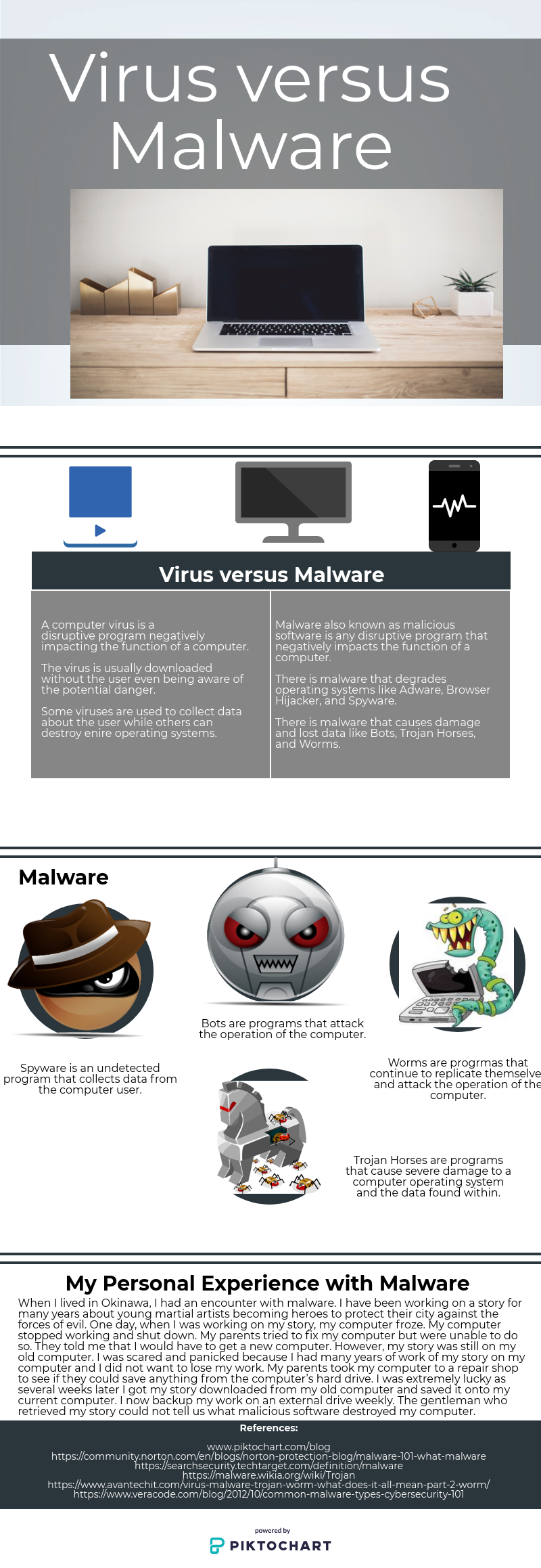
After conducting some research on cybersecurity I chose to further explore malware. Within malware I then learned about the computer virus and how the virus is related to malware. The beginning of the Piktochart shows the title which reflects a comparison of the two. As you move through the Piktograph I then give the differences between a computer virus and malware. Then I continued with examples of each. I closed the topic with a reflection regarding a personal experience I had with malware. Lastly, I gave all of my sources used.

Cybersecurity – Emily’s Story

What are your reactions to her story?

My reactions to her story are shocking. I knew what identify theft was but I never realized it could happen to anyone, not just adults but also teenagers who have an online account. I never knew the extent someone would go to achieve identity theft. Emily’s imposter was practically steeling her social life and lying about everything she sent online and how devastating it was for Emily Pickett.     

What did you learn from her story?

I learned from her story that pretty much anyone from teenagers in high school, to college students to adults who have online identities in places like Facebook, Twitter, Instagram, or SnapChat could easily have their online identities stolen. In this story, the imposter actually believed she was Emily Monroe also known as Emily Pickett.

How might you use this story to inform your life or that of others?

I might use this story to inform the lives of others who have social media online like Facebook, Twitter, Instagram, or SnapChat by showing them the video to help them to better protect their online identities from identity theft.

My PowToon Video: Phone Addiction

The topic of my PowToon video is phone addiction. My video briefly states what phone addiction is, works through problems of phone addiction, and then closes with solutions and the way ahead.

My first impression of using PowToon was this may not be as easy as the tutorial said it would be. To my surprise all went quite well except when I tried to change the timing of my slides. The timeline was a little tricky and I would need to practice for future projects.  

I would use this technology in the future for both work and school.

My ThingLink Experience

My topic for my ThingLink project is a representation of my experience at the Australia Zoo and also incorporating the ARCS Model into the presentation. My intended audience are students K-12 as well as college and adults. This presentation is intended for all who want to see and learn more about the magnificent animals found on this planet.

Attention – the mighty tiger is one of the most powerful creatures in the animal kingdom.

Relevance – Showing some of the animals found in the Australia Zoo shows the importance of preservation.

Confidence – In sharing my knowledge and experiences I hope to instill curiosity and hope to others to also want to help to preserve the beautiful creatures that live among us.

Satisfaction – Simply comes from others watching and possibly stepping up to help.

Initially I did not feel that the tutorial helped me as much as it could because she was working on a MAC and I am not. After several tries I did however get the items to work the way I wanted them to. I like this program and I could use this application in the future at my zoo.

My Narrated PowerPoint

After watching Professor Hatten’s tutorial on Narrated PowerPoint, no matter how many time I tried to upload my PowerPoint video to my blog per the steps given, it never loaded. I then went back to my original PowerPoint presentation and saved it as WMV and uploaded to my YouTube account.

PowerPoint

1.  As a whole, do you think PowerPoint has helped or hindered education in the United States? Why?

As a whole I think PowerPoint has helped education in the United States. PowerPoint is another means of learning and a useful tool when doing educational work. It allows you to created slides to create notes for school or a workplace. It also allows individuals to make professional presentations with a variety of layouts and designs.    

2. What two suggestions from the readings about how to use PowerPoint effectively do you think are the most important to remember? Why?

The two suggestions from the readings about how to use PowerPoint effectively are keep it simple and engage your audience and make your point. To keep a presentation simple, it is important not to put too much information on each slide. It is also important to keep the presentation simple because you want to talk about your slides, not read them. When you start to talk about your presentation, you what to engage your audience immediately and get them interested in your slides from the very beginning. You need to make your point and clearly state what you are trying to present on the very first slide.

3. What is one thing you learned about PowerPoint that you did not previously know?

One thing I learned about PowerPoint that I did not previously know was that a video could be embedded onto a slide to enhance my message. I knew I could use images to enhance my message as I have done so with prior presentations.